 Loft
Loft
Loft
Nobody asked for the notch. Loft makes it useful.
It sits in the middle of the menu bar and takes up room exactly where you need it. macOS simply lets icons disappear — without warning. Usually you only notice when you go looking for one.
Loft turns the problem around: the notch itself becomes the switch. Point at it, it lights up. One click, and the menu bar runs edge to edge again. The vanished icons are back.
Click the notch to reclaim your full menu bar.
The shortest way is the obvious one: click straight into the notch. As soon as the pointer reaches it, its outline turns blue. A click switches the notch off and whatever was hidden has room again; a double-click on an empty spot brings the notch back. With the MacBook lid closed on an external monitor Loft leaves the display untouched — it never changes a resolution that is not its own.
On request the notch returns by itself: a ring counts the seconds down, and a click on it brings the notch back at once. You set the length in the settings (20 seconds to 2 minutes); by default the countdown is off. In the capsule you choose directly when switching off: 1 minute, 2 minutes or permanent. On quit Loft restores it anyway.
Orange warns. Blue switches. Turquoise keeps your Mac awake.
One colour per meaning, the same throughout the app. Four states, no explanation needed.




Right-click the notch and a narrow row opens beneath it: presentation mode, keep the Mac awake, display as well, end time, turn the notch off, mute the orange warning — and a way to the window and the settings. No menu, no printed labels — colour, icon and remaining time say what is running. Turquoise means “running now”, grey means “off”. Rest the pointer on a button and a short hint appears. After the second time you stop looking.

A right-click on the notch opens the capsule. While the Mac is kept awake, the pointer is enough.
Hold the Option key (⌥) and a click on the notch opens whatever you put there — a website or an application. While the key is held, what will happen is shown under the menu bar, so there is nothing to remember and no accidental click. Nothing is set up out of the box.

When the battery drops below the threshold you set, Loft says so in red beside the notch — not a notification to dismiss, but a mark where you are looking anyway. The warning is off by default; turn it on in the settings and pick the threshold yourself.

One narrow window, three parts, no title bar.
It floats top center under the menu bar, translucent over whatever lies behind it. It tells you the number and nothing else — while it is open Loft is a visible application with a deliberately very short menu, and the icons a long menu pushed out come back on their own.
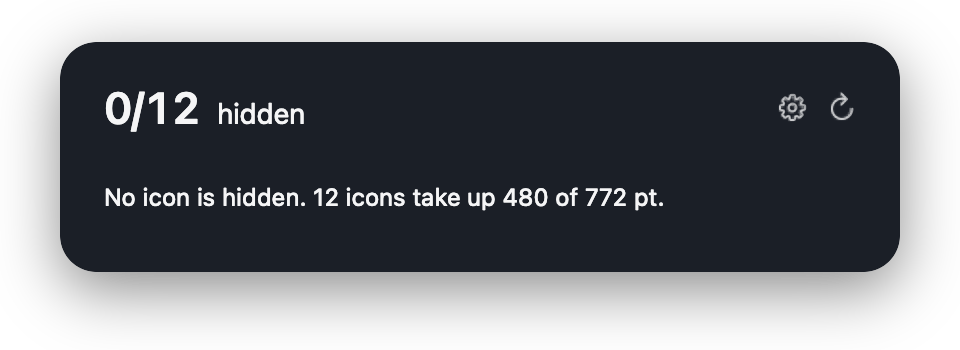
Here the resting state: 12 icons take 480 of 772 pt, nothing is hidden.
It counts.
Loft works out from window geometry how many status items are not being drawn right now. You find out that something is missing — instead of noticing when you go looking and cannot find it.
No permission prompts.
The count and the notch switch work without any system permission. No dialog on first launch, no screen recording, no account — Loft runs the moment you open it.
It makes room where there was none.
The notch costs you 956 points of menu bar. One click on it and it is gone — the bar runs edge to edge, and a double-click brings the notch back. In one measured case all eight hidden icons returned at once.
Your screen stays private.
Tools of this kind photograph the menu bar and need the screen recording permission for it. Loft does not: it works from the system’s window data. It records nothing and sends nothing. Settings and a local diagnostic log stay on your Mac.
Loft needs no system permission whatsoever. The count, the notch switch and the keyboard shortcuts work without a single authorization dialog.
Do you even need Loft? — the self-check
Do you even need Loft?
Loft shows you these numbers on first launch. If there is nothing to do, it says so instead of pretending.
Then yes. The notch halves your menu bar — on a 16-inch machine only 772 of 1728 points are left for icons.
Measuring helps as soon as the bar really overflows — because an app with a long menu pushes the icons out, for instance. There is no notch switch here.
On a 2560-point-wide screen with 28 icons, 1144 points are taken — not even half, and nothing is hidden that Loft could bring back. Worked out from window geometry.
What Loft is not
Loft does not tidy your menu bar. It hides nothing and reorders nothing.
Loft solves the other problem: the icons that disappear behind the notch — the ones you never notice are already gone.
How it feels
Press the hotkey. The window appears top center, under the menu bar, and tells you the number. If something is missing the notch glows orange — one click on it, and the bar runs edge to edge.
Loft takes no space in the menu bar itself. A tool against a lack of space must not take space. To close: Escape. Nothing is changed without you asking.
Loft is coming to the Mac App Store. Write to the contact form if you would like to be told.
On the Mac App Store, Loft is listed as LoftUp — the name “Loft” was already taken there. On your Mac the app is still simply called Loft.